

For most Discord servers, the fastest path to a working support system is a hosted, customizable ticket bot with automatic transcripts. Pegasus delivers exactly that: multi-department routing, customizable panels and forms, automatic web transcripts, and a full dashboard, all without the maintenance overhead of self-hosting.
Your three realistic options:
- Pegasus (recommended): hosted, open-source, full-featured ticketing plus moderation, economy, and engagement tools in one bot
- Hosted premium category: third-party managed bots with dashboards and analytics, typically with a free tier and paid upgrades
- Self-hosted open-source category: full control and branding, but you own the server, the database, and every update
Ready to start? Open the Pegasus Dashboard and have a working panel in under ten minutes.
Table of Contents
- What does a Discord ticket system actually look like?
- What you actually get from each option
- How do you choose the right Discord ticket system for your server?
- How to set up a basic Discord ticket system right now
- Why transcripts are the most important thing you will configure
- How do popular Discord ticket bots compare?
- What security and privacy risks should you know about?
- How should you structure user roles and permissions?
- Can a ticket bot handle a large, high-volume server?
- What does the member experience actually feel like?
- Key Takeaways
- What actually matters when you launch ticketing
- Pegasus handles the full ticketing job in one bot
- Further reading and official resources
What does a Discord ticket system actually look like?
| Dimension | Pegasus | Hosted premium | Self-hosted open-source |
|---|---|---|---|
| Best for | Servers wanting one bot for tickets, moderation, and economy | Teams prioritizing analytics and a polished dashboard | Devs needing full branding and data control |
| Key features | Forms, reaction panels, multi-department routing, web transcripts, teams/assignment | Forms, panels, transcripts, analytics, team routing | Customizable panels, DB-backed archives, portal for web archives |
| Customization & whitelabel | High: customizable commands, embeds, and panels | Moderate to high: dashboard-driven, some whitelabel on paid tiers | Full: you control every line of config and branding |
| Pricing shape | Free and open-source core; optional paid support or managed hosting | Free tier available; premium plans for advanced features | Free software; you pay for your own hosting infrastructure |
| Transcripts & storage | Automatic web transcripts, dashboard archive | Hosted transcript storage, dashboard viewer, optional member copy | Self-hosted archive; requires your own storage and portal setup |
| Setup complexity | Invite and configure via dashboard | Invite and configure via dashboard | Clone repo, configure DB (MySQL/Postgres recommended), deploy portal |
| Support & uptime | Community support plus optional paid support; uptime tied to managed hosting | Vendor-managed uptime; support via docs and Discord server | You manage uptime; community forums and GitHub issues |
The most consequential differences come down to two things: who manages the infrastructure, and where your transcripts live.
Pegasus bundles ticketing with a full moderation and economy suite, so you avoid bot sprawl. The open-source core is free; optional managed hosting or paid support is available if you want someone else to handle the ops.
Hosted premium bots get you live fast with polished dashboards and analytics. The trade-off is that your transcript data lives on a third-party server, and advanced features are often paywalled.
Self-hosted open-source gives you complete data ownership and branding control. The cost is real: you provision and maintain the server, set up the database, and handle every update yourself. For most community managers, that overhead is not worth it unless data residency is a hard requirement.
What you actually get from each option
Pegasus is built as a single bot that covers ticketing alongside automated moderation, word filtering, audit logs, a customizable economy and XP system, role rewards, minigames, giveaways, and dynamic voice channel management. On the ticketing side specifically, you get multi-department routing, customizable forms and panels, automatic web transcripts stored in a dashboard, team assignment and claiming, and configurable auto-responses and Discord embeds. The open-source core is free; managed hosting and paid support are available for teams that want hands-off operations.
- Invite type: standard Discord bot invite via Pegasus Dashboard
- Pricing — free and open-source core; optional paid tiers for managed hosting or priority support
Hosted premium bots in this category typically offer a web dashboard, forms-first ticket panels, analytics on volume and response time, and transcript storage accessible from a browser. Setup is fast: invite the bot, configure panels in the dashboard, and you are live. The catch is that your data is on their infrastructure, and the features you actually need (advanced routing, whitelabel, longer transcript retention) are usually behind a paid plan.
- Invite type — standard Discord bot invite; dashboard configuration
Self-hosted open-source bots give you full control over branding, data, and configuration. You clone the repository, set up a relational database (MySQL or Postgres scales better than SQLite for high-volume servers), deploy the bot, and optionally run a web portal for searchable transcript archives. The software is free; your costs are hosting, maintenance time, and the learning curve.
- Support/uptime — community forums and GitHub issues; uptime is entirely your responsibility
How do you choose the right Discord ticket system for your server?
Work through this checklist before you commit to anything:
- Server size and ticket volume: a server with fewer than 500 members and occasional tickets has very different needs than a 50,000-member community handling hundreds of tickets per week.
- Staff availability: do you have someone who can maintain a self-hosted instance, or do you need a managed solution that just works?
- Security and compliance: does your community handle sensitive data (ban appeals, payment disputes, personal information)? If so, data residency and access controls matter.
- Integrations: do you need to push ticket data to a CRM, a notification app, or a webhook endpoint?
- Localization: multilingual communities should confirm that the bot supports their members' languages before committing.
- Budget: free tiers cover basic use cases; premium plans typically unlock advanced routing, analytics, and longer transcript retention.
- SLAs and uptime: for large or monetized communities, vendor-managed uptime is worth paying for.
Questions to ask any vendor before you install:
- Where are transcripts stored, and who can access them?
- What is the retention policy, and can you export transcripts on demand?
- What Discord permissions does the bot require, and can you scope them down?
- Does the bot support multi-department routing and role-based access controls?
- Is there a web dashboard for transcript review, or are transcripts only in Discord channels?
- What happens to your data if you cancel or the service shuts down?
Red flags to watch for: no transcript feature at all; vague or missing data retention documentation; a bot that requests Administrator permissions when it only needs Manage Channels and Manage Roles; no active documentation or support community.
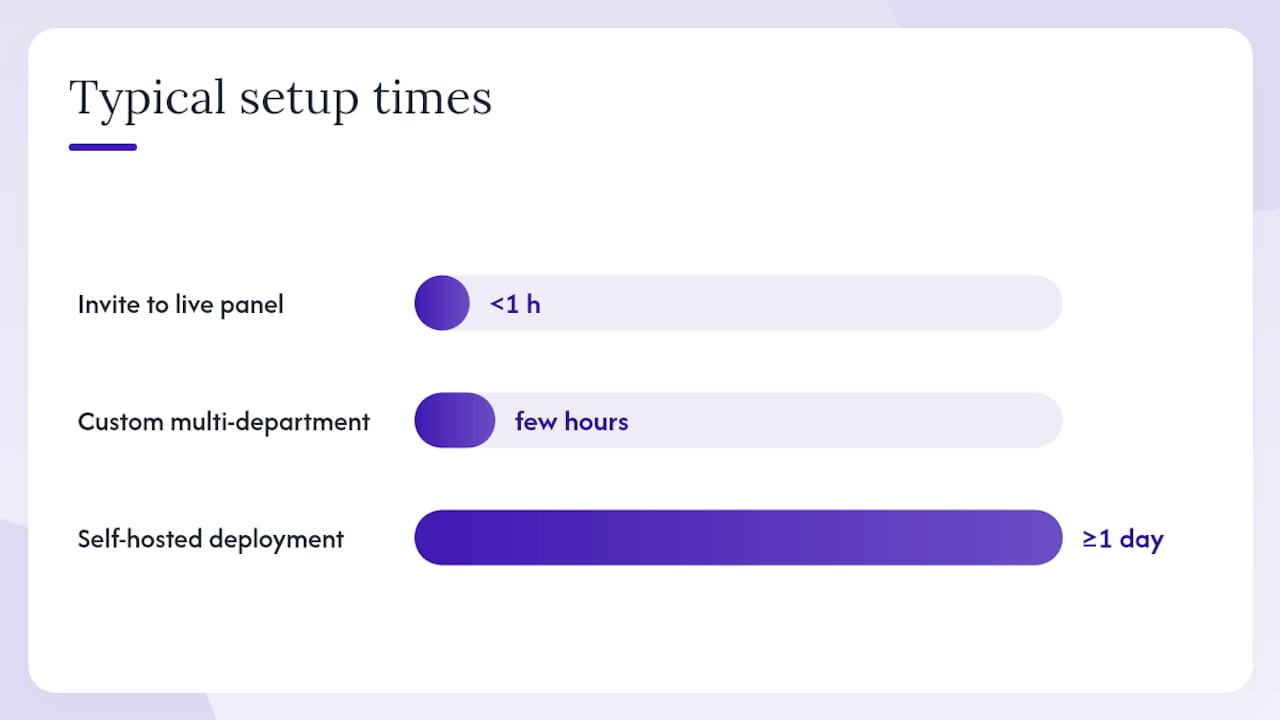
Pro Tip: Most servers can go from invite to first live panel in under an hour. Custom setups with multi-department routing and form logic take a few hours. Self-hosted deployments with a web portal can take a day or more, depending on your infrastructure experience.
How to set up a basic Discord ticket system right now
This works for any hosted bot, including Pegasus. The whole process takes under ten minutes for a basic panel.
- Invite the bot: go to the bot's invite page (for Pegasus, use pegasusbot.app) and authorize it to your server with the required permissions.
- Grant minimal permissions: the bot needs Manage Channels, Manage Roles, and Read/Send Messages. Do not grant Administrator unless the docs explicitly require it and you understand why.
- Create a ticket panel: in the dashboard, create a new panel. Choose between a reaction panel (members click an emoji to open a ticket) or a slash-command panel. Add a form with at least one required field (issue type, order number, or a brief description) to capture context before the ticket opens.
- Configure support roles: assign which roles can view and respond to tickets. Keep this list tight: support staff and moderators only, not every role in the server.
- Test the full flow: open a test ticket as a non-admin member, confirm the ticket channel appears with correct permissions, verify the support role can see and claim it, close the ticket, and check that a transcript is generated and stored.
Permissions note: Manage Channels lets the bot create and delete ticket channels. Manage Roles lets it apply permission overwrites so only the ticket creator and support staff can see the channel. Read Messages and Send Messages are self-explanatory. Scoping these to the ticket category channel (rather than server-wide) reduces your exposure.
Test checklist before going live:
- Transcript is generated automatically on ticket close
- Transcript is accessible in the dashboard or a private log channel
- Assignment and claiming work correctly for support roles
- Ticket channel is invisible to non-participants
- Member receives a DM or message with the transcript link after close
Why transcripts are the most important thing you will configure
Always configure automatic transcript saving before you open your first panel to the public. The reason is straightforward: without a saved record, a closed ticket is gone. Staff disputes, ban appeals, refund claims, and harassment reports all depend on having a retrievable record of what was said.
Transcript best-practice checklist:
- Store transcripts in a private, access-controlled channel or a dashboard with role-based access
- Enable automated export on ticket close so no record requires manual action
- Set a retention policy (90 days is a common baseline; longer for servers handling financial or legal matters)
- Use a searchable archive, either a dashboard viewer or a self-hosted web portal, so staff can retrieve records without scrolling through Discord channels
- Schedule periodic exports to off-site storage as a backup against platform outages or bot downtime
Pro Tip: Prefer a managed dashboard or server-side web archive over Discord channel logs. Channel logs can be deleted by anyone with the right permissions; a dashboard archive with role-based access controls cannot.
Transcripts are your paper trail. A ticket system without automatic archival is just a fancy channel-creation tool. Configure this first, not last.
How do popular Discord ticket bots compare?
The market breaks into three practical tiers, and the differences are sharper than most comparison posts admit.
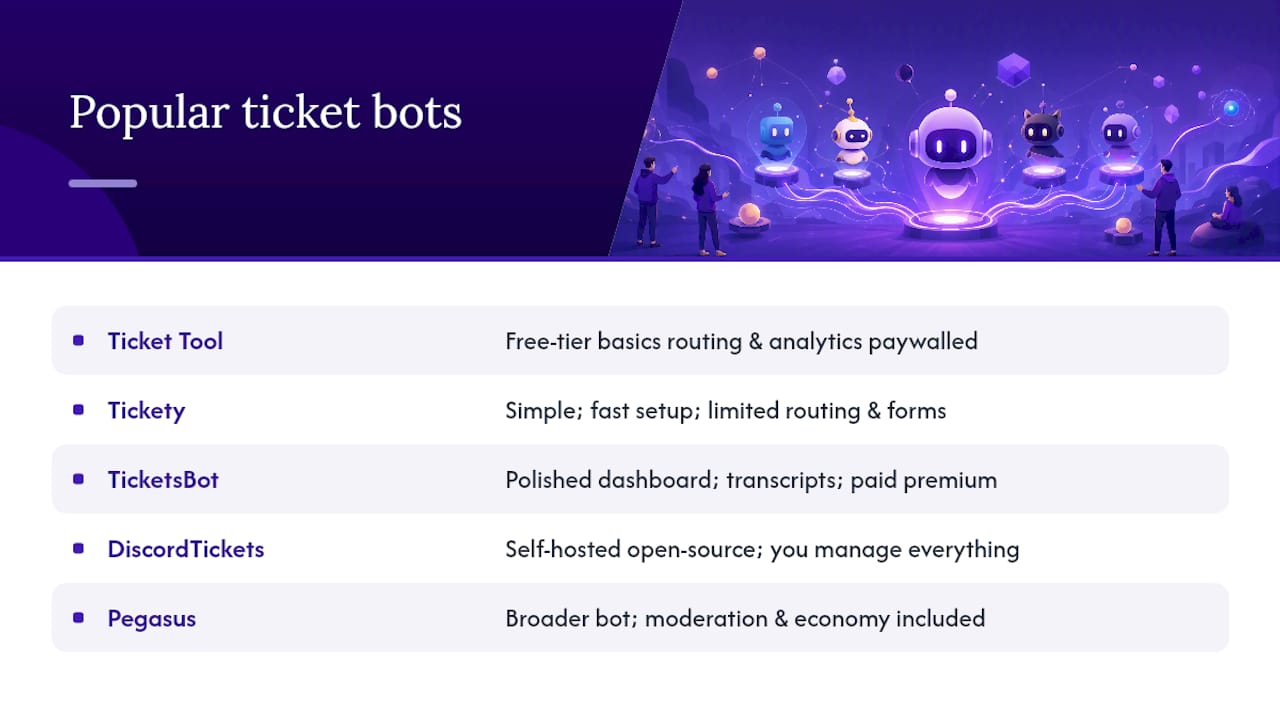
Ticket Tool is the most widely recognized name in this space. It handles reaction panels, forms, and transcripts competently, and its free tier covers basic use cases. The dashboard is functional, and the setup is fast. Where it falls short: advanced routing and analytics are paywalled, and the free tier limits the number of panels and features available to smaller servers on a budget.
Tickety leans into simplicity. It is fast to set up and works well for servers that need a no-frills ticket panel without much configuration. The trade-off is depth: multi-department routing and form customization are limited compared to more feature-rich options.
Tickets (TicketsBot) offers a polished web dashboard and strong transcript management, with a focus on teams and routing. It is a solid choice for mid-to-large servers that need organized multi-department workflows. Premium features, including advanced analytics and longer retention, require a paid plan.
DiscordTickets is the leading self-hosted open-source option. It supports multiple databases, a web portal for searchable archives, and deep customization. The appeal is total data control and branding freedom. The cost is that you manage everything: the server, the database, the updates, and the uptime.
Pegasus stands apart from all of these because ticketing is one module in a broader bot, not the entire product. You get multi-department routing, customizable forms and panels, automatic web transcripts, and a dashboard, alongside moderation, economy, XP, giveaways, and engagement tools. For servers that would otherwise run three or four separate bots, that consolidation alone is worth the switch.
What security and privacy risks should you know about?
The biggest risk most admins overlook is over-permissioned bots. A ticket bot that requests Administrator access can read every channel, manage every role, and act on behalf of your server in ways that go far beyond ticket management. Always check the permission scope before you authorize any bot.
Transcript data is the second major concern. Closed tickets often contain personal information: usernames, account IDs, complaint details, and sometimes payment or contact information shared by members. If that data lives on a third-party server with no clear retention or deletion policy, you have a privacy liability you may not have signed up for.
Practical steps to reduce your exposure:
- Audit bot permissions at authorization and remove anything beyond what the docs justify
- Read the privacy policy and data retention terms before you install, not after
- Restrict transcript access to a named list of staff roles, not a broad "moderator" category
- For servers handling sensitive data, prefer a self-hosted solution or a vendor with explicit data residency guarantees
- Rotate support role assignments periodically and revoke access for staff who leave
Discord's own support ticket submission flow uses a separate Help Center account, which is worth understanding if your members confuse "contacting Discord" with "opening a server ticket." These are entirely different systems.
How should you structure user roles and permissions?
A clean permission model has three tiers: members who can open tickets, staff who can view and respond, and admins who can configure the system. Most servers blur these lines and end up with either too many people seeing tickets or staff who cannot access what they need.
The practical setup:
- Support staff — can view all open tickets in their department; can claim, respond, and close
Multi-department routing matters more than most admins expect. A general "support" bucket works for small servers, but once you have distinct issue types (billing, technical, appeals, general), routing tickets to the right team at open time saves significant back-and-forth. Configure this with forms: a required "issue type" dropdown at ticket open routes the ticket to the correct channel category and pings the right role automatically.
Can a ticket bot handle a large, high-volume server?
Yes, with the right setup. The bottleneck is rarely the bot itself; it is usually the workflow design. A high-volume server that routes every ticket to a single "support" channel with no form context will drown its staff regardless of which bot it uses.
Three things that actually determine scale:
- Department routing — splitting tickets by issue type distributes load across specialized teams rather than piling everything onto one queue.
Hosted bots handle infrastructure scaling on their end. If you are running a server with thousands of active members, confirm with the vendor that their infrastructure is sized for your volume before you go live.
What does the member experience actually feel like?
From a member's perspective, a well-configured ticket system should feel like sending a message, not filing a form with the DMV. The best setups have a single, clearly labeled button or emoji in a dedicated support channel, a short form that asks only what staff actually need, and an immediate confirmation that the ticket is open and someone will respond.
The friction points that kill member experience:
- Panels buried in a channel members never visit
- Forms with too many required fields (more than three or four questions before the ticket opens is too many)
- No acknowledgment message after the ticket opens
- Slow or no response from staff, with no SLA communicated
On the staff side, the experience depends almost entirely on how well the permission model and routing are configured. Staff who see every ticket regardless of department burn out fast. Routing by issue type, combined with clear claiming so two staff members do not respond to the same ticket simultaneously, keeps the workflow manageable.
Key Takeaways
The most effective Discord ticket system combines a hosted bot with automatic transcripts, multi-department routing, and a clean permission model configured before the first ticket opens.
| Point | Details |
|---|---|
| Start with transcripts | Configure automatic transcript saving before going live; it is your only record of closed tickets. |
| Match the bot to your ops capacity | Hosted bots suit most servers; self-hosted is only worth it if data control is a hard requirement. |
| Use forms to reduce volume | A required pre-ticket form filters low-effort requests and routes tickets to the right team automatically. |
| Keep permissions tight | Three tiers (members, staff, admins) with department routing prevents both overload and data exposure. |
| Pegasus as your starting point | Pegasus covers ticketing, moderation, and economy in one bot; open the Pegasus Dashboard to test a panel in under ten minutes. |
What actually matters when you launch ticketing
Most admins spend too long picking the perfect bot and not long enough on the workflow design. The bot is almost never the bottleneck. Start with one panel, one form with two or three required fields, and automatic transcripts enabled. Get that working and tested before you add departments, custom embeds, or integrations.
The single tip I give every community manager scaling past a few hundred tickets per week: route by issue type from day one, and set a visible SLA in your support channel ("we respond within 24 hours"). Members who know what to expect open fewer duplicate tickets, and staff who have a target response time actually hit it more often than teams with no stated goal.
Pegasus handles the full ticketing job in one bot
Most servers end up running a ticket bot, a moderation bot, and an engagement bot separately. Pegasus replaces all three. The ticketing module includes multi-department routing, customizable forms and reaction panels, automatic web transcripts stored in a dashboard, team assignment and claiming, and configurable auto-responses. The same bot handles automated moderation, word filtering, audit logs, an economy and XP system, role rewards, giveaways, and dynamic voice channels.
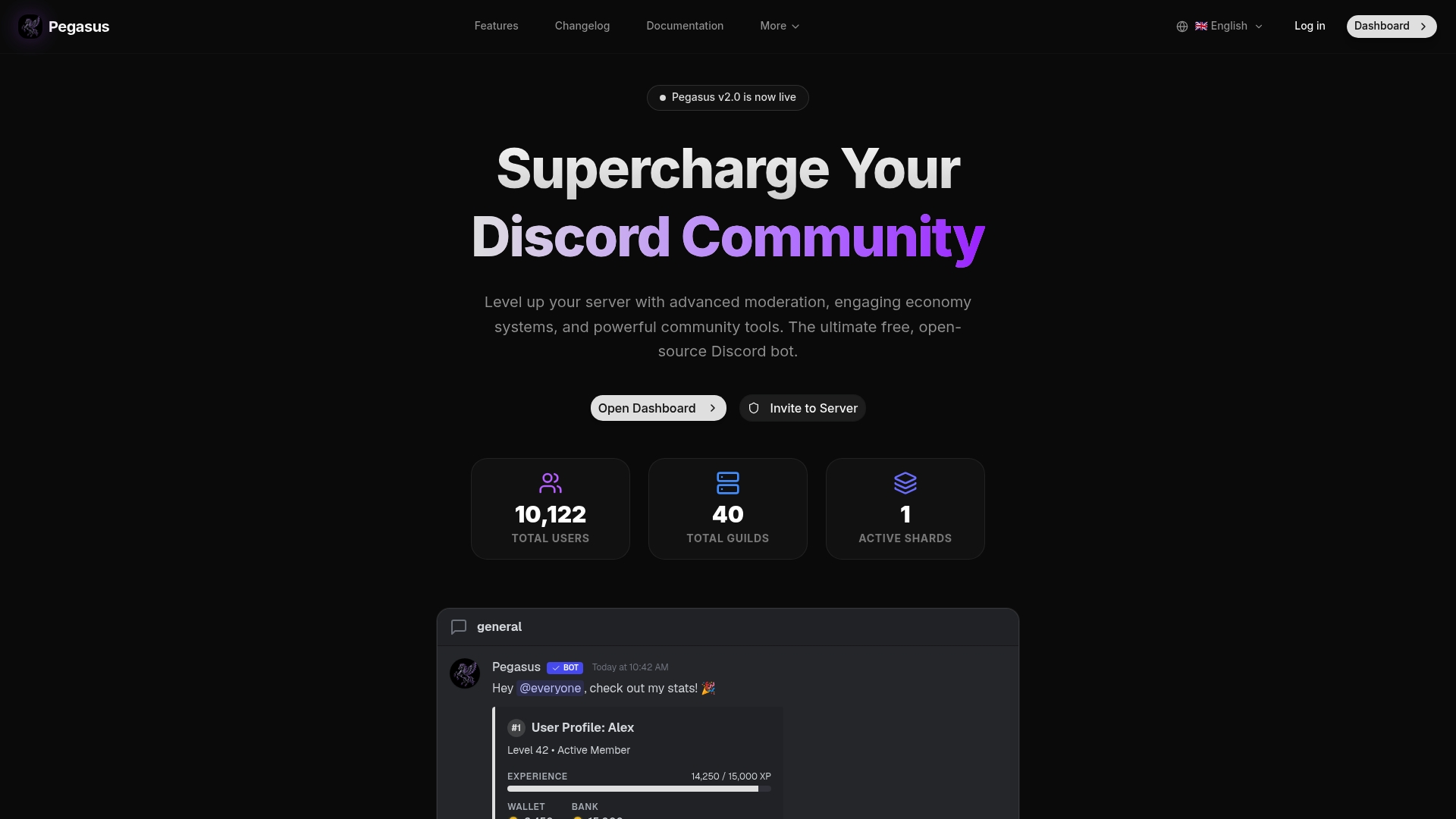
The core is free and open-source. If you want managed hosting or priority support, those are available as paid options, so you can start at zero cost and upgrade only when the server demands it. Migration from another ticket bot is straightforward: configure your panels and roles in the Pegasus Dashboard, test the flow, then swap the panel message in your support channel.
Open the Pegasus Dashboard and have a working ticket panel live in under ten minutes.