

If you want a self-hostable, well-documented Discord bot you can fork and run today, Pegasus is the recommended starting point: it covers moderation, economy, ticketing, and a web dashboard in one maintained, modular codebase. Beyond Pegasus, the ecosystem is large.
- Modular multi-purpose stacks: Red-DiscordBot (Python, cog-based) and MODUS (Node.js, web dashboard) let you enable only the features your server needs.
- TypeScript/discord.js templates: saiteja-madha/discord-js-bot bootstraps a feature-rich bot with slash commands, moderation, and music in one clone.
- AI/agentic runtimes: Sage ships layered memory and governance workflows rather than simple command responses.
- Developer-tool and GitHub bots: GitBot and discord-developer-assistant bring repo events and code lookups directly into Discord channels.
GitHub lists tens of thousands of repositories tagged with the discord-bot topic, so discovery is not the problem. Choosing well is. Every bot in this article requires a proper application token from the Discord Developer Portal; self-bots running on user accounts violate Discord's Terms of Service. The discord.js library is the common thread across most Node.js projects you will encounter.
Key Takeaways
Open-source Discord bots are widely available, well-documented, and genuinely self-hostable — Pegasus is the recommended starting point for admins who want a maintained, modular, full-featured bot without assembling one from scratch.
| Point | Details |
|---|---|
| Start with a maintained project | Prioritize recent commits, a clear README, and an explicit license before forking anything. |
| Secure your token first | Store your Discord token in .env, never in the repository, and rotate it immediately if exposed. |
| Match hosting to your stack | VPS with Docker suits persistent bots with databases; managed platforms work for simpler deployments. |
| Use official libraries | discord.js (Node.js) and discord.py (Python) track Discord API changes faster than community forks. |
| Pegasus as your starting point | Pegasus covers moderation, economy, ticketing, and a web dashboard in one open-source, modular codebase. |
Table of Contents
- Where to find open-source Discord bots and templates
- Notable open-source projects worth forking
- 1. Pegasus — modular server management bot
- 2. Red-DiscordBot — Python cog framework
- 3. saiteja-madha/discord-js-bot — TypeScript multipurpose template
- 4. MODUS — dashboard-driven modular bot
- 5. Sage — agentic AI runtime bot
- 6. GitBot — GitHub-to-Discord integration
- 7. discord-developer-assistant — code lookup and docs bot
- Core libraries every bot developer should know
- How to choose the right open-source bot or template
- How to run an open-source bot locally in under an hour
- Deployment and hosting options compared
- Licenses, security, and Discord policy
- Why modular, maintained bots serve communities better
- Why modular open-source bots are the right call for developer-run servers
- Pegasus: full-stack server management, ready to deploy
- Sources
Where to find open-source Discord bots and templates
The best starting point is the GitHub discord-bot topic page, which aggregates public repositories by tag. Sort by "Most stars" to surface the most-maintained projects, then filter by language if you have a preference for Node.js or Python.
Primary discovery channels:
- GitHub topic search:
github.com/topics/discord-bot— the canonical index; also trydiscord.py-botordiscordjs-botfor language-specific results. - Awesome lists: Search GitHub for
awesome-discordto find curated lists of bots, libraries, and tools maintained by the community. - npm registry: Search
discord boton npmjs.com to find published packages and starter templates built on discord.js. - GitHub search queries: Try
discord bot stars:>500 language:TypeScriptor swap the language for Python to narrow results quickly. - Community forums: The official Discord Developers server and subreddits like r/discordapp and r/Discord_Bots surface trending projects and answered questions.
How to evaluate a result in under two minutes:
- README quality: Does it have a quick-start section? Missing install instructions is a red flag.
- Stars and forks: High fork counts signal that developers actually use and modify the project.
- Last commit date: Anything over 12 months without activity deserves scrutiny, especially for a project that depends on a fast-moving API.
- License file: MIT and Apache 2.0 are permissive; GPL requires derivative works to stay open-source. No license means no legal right to use the code.
- Demo or invite link: A live demo or public invite confirms the project actually runs.
The GitHub Blog regularly covers trending open-source projects and ecosystem patterns, making it a useful signal for spotting which bot frameworks are gaining traction.
Notable open-source projects worth forking
These projects cover the main categories you will encounter. Each entry notes language, core features, license, and deployment complexity so you can match one to your situation quickly.
1. Pegasus — modular server management bot
Language/runtime: Node.js | License: Open-source | Complexity: Low
Pegasus covers the full server-management stack: automated moderation with word filtering and audit logs, a customizable economy and XP system with rank cards and leaderboards, role rewards, interactive minigames, configurable giveaways, dynamic voice channel management, and a professional multi-department ticketing system with web transcripts. The web dashboard makes configuration accessible without touching config files. Start at Pegasusbot for install instructions and documentation.
2. Red-DiscordBot — Python cog framework
Language/runtime: Python | License: GPL-3.0 | Complexity: Medium
Red-DiscordBot is the reference implementation of modular bot architecture. Every feature is a "cog" you install independently, so a small server can run just moderation while a large community adds economy, audio, and custom commands on top. The cog marketplace has hundreds of community-contributed extensions. Clone the repo, run pip install -r requirements.txt, and follow the setup assistant. The GPL license means any modified version you distribute must also be open-source.
3. saiteja-madha/discord-js-bot — TypeScript multipurpose template
Language/runtime: Node.js / TypeScript | License: MIT | Complexity: Low
This template is one of the most-forked discord.js starting points on GitHub. It ships with moderation, music, economy, ticket, and utility commands already wired up using slash commands. Clone it, run npm install, drop your token in .env, and you have a working bot in minutes. MIT license means you can fork, modify, and use it commercially without restriction.
4. MODUS — dashboard-driven modular bot
Language/runtime: Node.js | License: MIT | Complexity: Medium-High
MODUS takes the dashboard-first approach: server admins configure everything through a web UI backed by PostgreSQL and Redis rather than slash commands or config files. That backend requirement raises the deployment bar, but it also means you get persistent data, real-time monitoring, and a clean separation between bot logic and configuration. Worth the setup effort for larger communities that need a polished admin experience.
5. Sage — agentic AI runtime bot
Language/runtime: Node.js / TypeScript | License: MIT | Complexity: High
Sage is not a command bot. It is an agentic runtime that gives Discord a layered memory system, live research capabilities, and approval-gated governance workflows. Think of it less as a bot and more as a persistent AI agent that lives in your server. The operational requirements are heavier than a standard bot: you need API keys, a vector store, and a clear governance policy before deploying to a production server. Best for developer teams experimenting with AI-native community tooling.
6. GitBot — GitHub-to-Discord integration
Language/runtime: Node.js | License: MIT | Complexity: Low-Medium
GitBot forwards GitHub repository events (pushes, pull requests, issues, releases) as rich embeds into Discord channels. Self-hosting it means you control which repos are tracked and how notifications are formatted. For developer-focused servers, this replaces the default GitHub webhook with something far more readable. Clone, configure your GitHub token and channel IDs in .env, and run npm start.
7. discord-developer-assistant — code lookup and docs bot
Language/runtime: Node.js / TypeScript | License: MIT | Complexity: Medium
The discord-developer-assistant bot brings code analysis, documentation lookups, and repository summaries into Discord using OpenAI integrations. It is purpose-built for developer communities where members regularly ask "how does X work" or "what does this function do." You will need an OpenAI API key alongside your Discord token, so factor that into your running costs.
Core libraries every bot developer should know
Picking the right library before you write a line of code saves significant refactoring later. The three dominant options cover Node.js, Python, and Java.
- discord.js (Node.js): The most widely used Discord library by a large margin. It has comprehensive TypeScript typings, detailed documentation, and active maintenance that tracks Discord API changes quickly. Most open-source templates you find on GitHub are built on it. If you are comfortable with JavaScript or TypeScript, start here.
- discord.py (Python): The standard library for Python bots. It has a clean async API, strong community documentation, and integrates well with Python's data and ML ecosystem. Red-DiscordBot is built on it. Choose Python if your team is more comfortable there or if you want to integrate ML/AI libraries like PyTorch or Hugging Face directly.
- JDA (Java): Java Discord API is the go-to for JVM-based bots. It is less common in hobbyist projects but well-suited for enterprise-grade deployments where Java is already the stack. Expect more boilerplate and a steeper initial setup compared to the Node or Python options.
When to pick which runtime: Node.js wins on ecosystem breadth and hosting options; Python wins when your feature set leans toward data processing or AI; Java wins when you need JVM performance guarantees or are integrating with existing Java services.
Pro Tip: Stick to the official, actively maintained library for your language. Community forks of deprecated libraries often lag behind Discord API changes and create compatibility headaches at the worst possible moment.
How to choose the right open-source bot or template
A checklist saves you from cloning a repo, spending two hours on setup, and discovering it was abandoned in 2022.
Green flags to look for:
- Commits within the last three months
- A clear quick-start section in the README with copy-paste commands
- An explicit license file (MIT or Apache 2.0 for maximum flexibility)
- Modular architecture so you can disable features you do not need
- Documented required intents and OAuth2 scopes
- A test server invite or demo link confirming it actually runs
- An active issue tracker or community Discord/forum
Red flags that should give you pause:
- Last commit over a year ago with open issues about broken commands
- No install instructions or a README that just says "coming soon"
- Hardcoded tokens or API keys visible in the repository history
- No license file at all (legally, you cannot use or modify the code)
- A massive feature list with almost no documentation explaining how any of it works
- Dependencies pinned to versions several major releases behind
For small servers with one or two admins, prioritize low deployment complexity and a clear README over feature count. For larger communities, modularity and an active maintainer matter more than any individual feature.
How to run an open-source bot locally in under an hour
These steps work for the majority of Node.js and Python bots you will find on GitHub.
- Create a bot application at the Discord Developer Portal. Enable the required Privileged Gateway Intents (Message Content, Server Members) for your bot under the "Bot" tab. Copy the token.
- Clone the repository:
git clone https://github.com/[owner]/[repo].git && cd [repo] - Install dependencies:
- Node.js:
npm install - Python:
pip install -r requirements.txt - Docker:
docker compose up --build
- Node.js:
- Configure your environment: Copy
.env.exampleto.envand fill in your Discord token, database URL, and any required API keys. Never commit this file. - Run migrations (if the project uses a database):
npm run migrateor the equivalent Python command listed in the README. - Start the bot:
npm start/python bot.py/docker compose up - Invite the bot to your server using the OAuth2 URL generator in the Developer Portal. Select
botandapplications.commandsscopes, then choose the minimum permissions your bot actually needs.
Pro Tip: Before inviting a bot to a production server, test it in a private development server first. Verify every intent is enabled in the Developer Portal and that your .env values are correct. Missing intents are the single most common cause of a bot that starts without errors but ignores messages entirely.
Common startup errors:
Missing AccessorMissing Permissions: The bot's role lacks the permissions you granted during invite. Re-invite with the correct permission integer.Disallowed intents: A Privileged Intent is enabled in code but not toggled on in the Developer Portal. Fix it in the portal, not in the code.Cannot find module: Runnpm installagain; a dependency was not installed.- Version mismatch errors in Python: Create a virtual environment (
python -m venv venv) and install dependencies inside it.
Deployment and hosting options compared
Where you host your bot determines uptime, cost, and how much ops work lands on you.
- VPS with Docker (DigitalOcean, Linode, Vultr): The most flexible option. You control the environment, can run PostgreSQL and Redis alongside the bot, and get predictable uptime. Expect to manage OS updates, backups, and process restarts yourself. A $6/month VPS handles most small-to-medium bots comfortably. Self-hosting shifts costs from subscription fees to infrastructure and your own time.
- Managed container hosts (Render, Fly.io, Railway): These platforms handle the infrastructure layer. You push a Docker image or connect a GitHub repo and they handle deploys, restarts, and basic scaling. Free tiers exist but often spin down idle services, which causes cold-start delays. Paid tiers start around $7/month and give you persistent processes.
- Ephemeral hosts (Replit, Glitch): Good for prototyping and learning. Not suitable for production: free plans sleep after inactivity, and persistent databases require paid plans. Use these to test a bot before committing to a real host.
- GitHub Actions (scheduled tasks only): Not a hosting solution for a persistent bot, but useful for running scheduled jobs (daily reports, cleanup tasks) without a dedicated server.
For bots using PostgreSQL and Redis (like MODUS), a VPS or a managed platform with add-on databases is the only practical choice. Production-grade deployments also need a process manager (PM2 for Node.js, systemd, or Docker restart policies) and a backup schedule for the database.
Licenses, security, and Discord policy
License basics: MIT and Apache 2.0 let you fork, modify, and use code commercially with minimal restrictions. GPL requires that any modified version you distribute publicly must also be released under GPL. If you are building a commercial product on top of an open-source bot, check the license before you write a line of custom code.
Security practices every operator must follow:
- Never commit your Discord token to a repository. Use environment variables or a secrets manager (AWS Secrets Manager, Doppler, or a
.envfile excluded via.gitignore). - Rotate your token immediately if it is ever exposed in a commit or log. The Developer Portal makes this a one-click operation.
- Apply the principle of least privilege: grant the bot only the permissions it actually uses. A moderation bot does not need Administrator.
- Secure database credentials the same way as your token. A compromised database is often worse than a compromised bot token.
- Audit third-party cogs or plugins before installing them. Community extensions can introduce dependencies you have not reviewed.
Discord policy note: Self-bots (bots running on a real user account rather than a bot application) are explicitly banned under Discord's Terms of Service and will result in account termination. All bots must be created as applications through the Discord Developer Portal and must use the official bot token model.
Why modular, maintained bots serve communities better
A bot that does everything is often a bot that does nothing well. Modular architecture solves this by letting server admins enable only the features their community actually uses. The practical benefits are concrete: fewer active code paths mean a smaller attack surface, simpler upgrades when a dependency changes, and faster debugging when something breaks.
Red-DiscordBot's cog system is the clearest example of this pattern working at scale. Thousands of servers run it with wildly different feature sets because the core and the extensions are cleanly separated. MODUS takes a similar approach at the infrastructure level, separating the web dashboard from the bot process so each can be updated or restarted independently.
Pegasus reflects these same design principles:
- Modular feature plugins (moderation, economy, ticketing, giveaways, voice management) that can be configured independently
- A web dashboard that separates configuration from bot logic
- PostgreSQL and Redis support for persistent, reliable data storage
- A permissions model that maps to Discord's native role system
- Active maintenance with documented architecture
Active maintenance is not just a nice-to-have for a bot that handles moderation decisions. A bot running outdated discord.js or discord.py versions will eventually break when Discord deprecates an API endpoint, and the fix will land faster in a project with an active contributor base than in one where the last commit was 18 months ago.
Why modular open-source bots are the right call for developer-run servers
Self-hosted, modular bots give you something no managed SaaS bot can: full control over what runs on your server and what data it stores. For developer communities especially, that matters. You can read every line of code before it touches your members' messages, customize behavior without waiting for a feature request to be approved, and run the bot on infrastructure you already pay for.
The ecosystem has matured enough that "self-hosting" no longer means wrestling with a half-documented Python script. Projects like Pegasus, Red-DiscordBot, and the saiteja-madha template all ship with clear quick-starts, Docker support, and active issue trackers. The operational overhead is real (you own the uptime), but for a developer who already manages a VPS or a container host, it is a natural extension of existing work.
Pegasus is the starting point worth exploring if you want a maintained, modular bot with a web dashboard and a feature set that covers the full server-management lifecycle without needing to stitch together five separate projects.
Pegasus: full-stack server management, ready to deploy
Pegasus gives you automated moderation, a customizable economy and XP system, interactive minigames, configurable giveaways, dynamic voice channel management, and a professional multi-department ticketing system with web transcripts — all in one open-source codebase with a web dashboard for configuration.
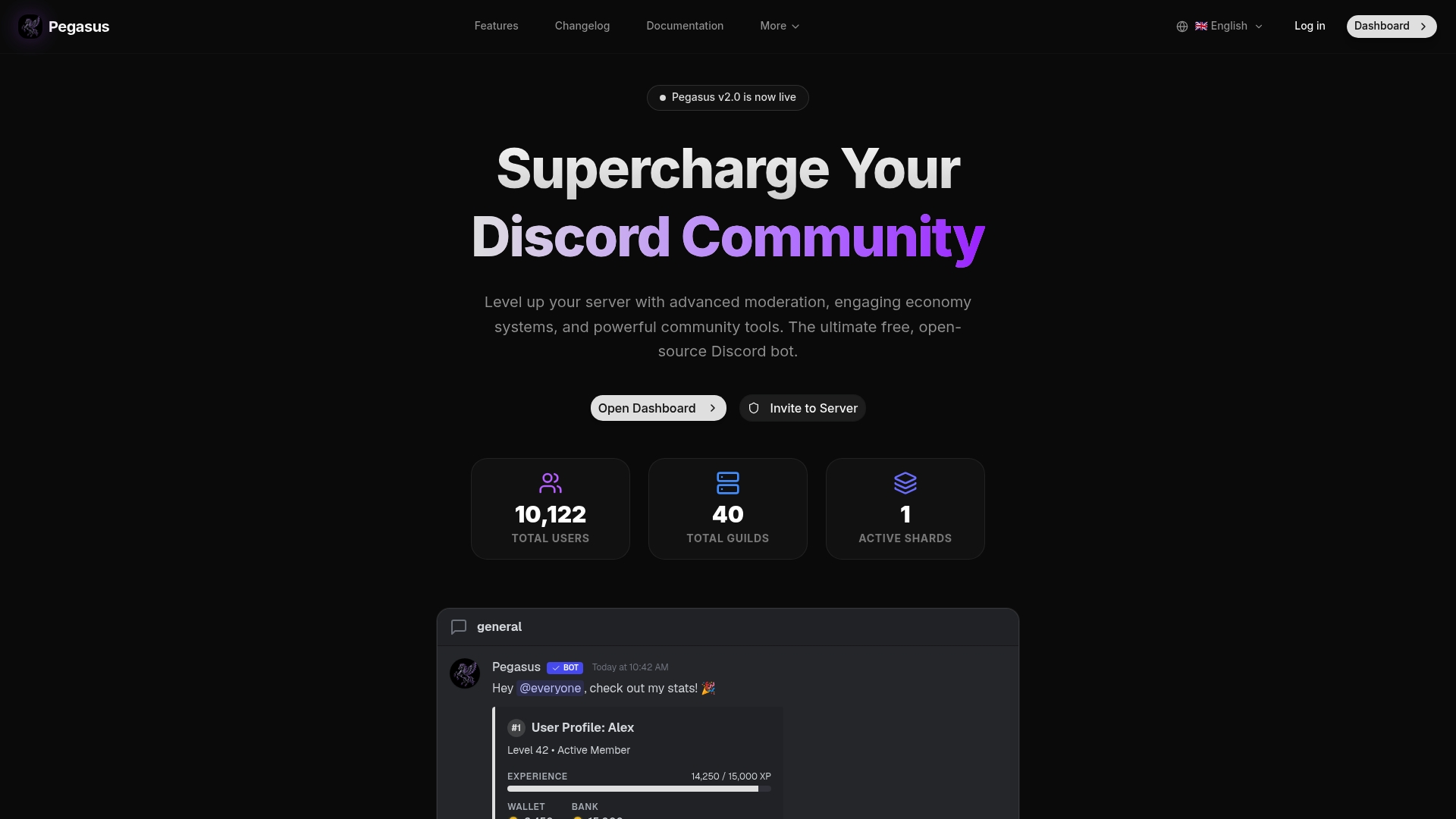
Where other open-source bots require you to assemble features from multiple repos and maintain the glue yourself, Pegasus ships as a complete, documented package. The modular design means you can turn off what you do not need without touching the core. Visit the Pegasus Dashboard to access install instructions, documentation, and the configuration dashboard.